

Best AI Research Assistants for 2026
The best ai research assistant in 2026 depends on whether you need fast answers, polished synthesis, or an auditable report you can defend.
If you are searching for the best ai research assistant in 2026, you are not really looking for a chat app. You are looking for a system that can gather sources, separate signal from noise, and ship something you can actually defend in a memo, doc, or decision.
Best AI research assistant for 2026: Perplexity for fast exploration, ChatGPT Deep Research for polished synthesis, and Rabbit Hole for auditable reports with citations, artifacts, and explicit confidence signals.
The real differentiator is not which tool sounds smartest. It is which one makes uncertainty visible when the answer might be wrong.
- Choose Perplexity if speed matters most.
- Choose ChatGPT Deep Research if polished narrative matters most.
- Choose Rabbit Hole if source triangulation, reusable artifacts, and confidence-aware output matter most.
Jump to the comparison table · Jump to the test · Try Rabbit Hole free
Start here: Choose Perplexity for speed, ChatGPT Deep Research for readable synthesis, and Rabbit Hole when the answer needs to survive scrutiny after the meeting.
Perplexity, ChatGPT Deep Research, and Rabbit Hole all promise research. They do not deliver the same thing. One is a fast answer engine. One is a long-form synthesis engine. One is a multi-agent research system that ships artifacts and makes its uncertainty visible.
We ran the same query through all three to show you the difference. Below is the short version, followed by screenshots, honest details, and trade-offs.
Quick comparison
If you want the short answer: Perplexity is best for fast exploration, ChatGPT Deep Research is best for polished synthesis, and Rabbit Hole is the best ai research assistant when you need an auditable report with explicit confidence signals.
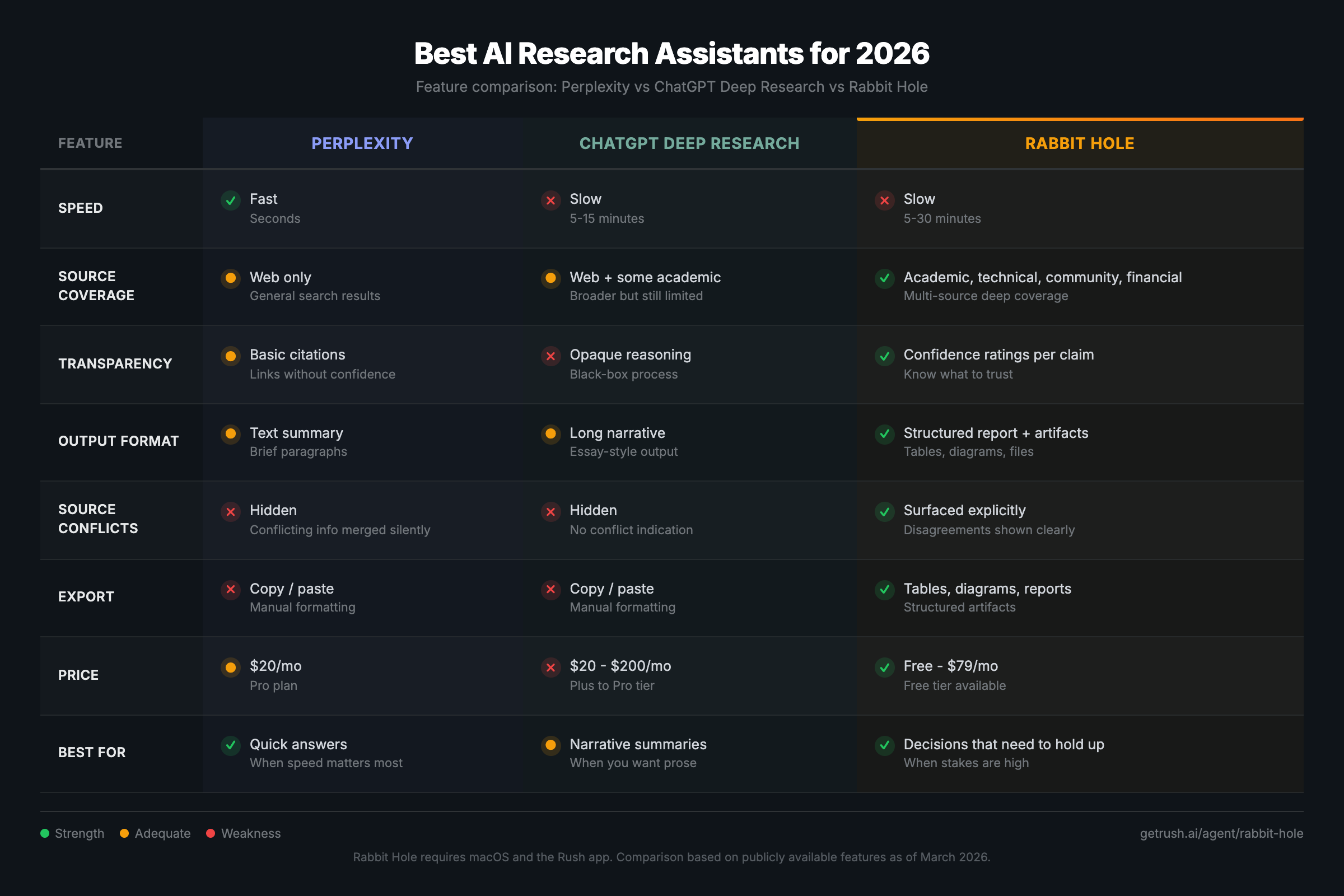
| Tool | Best for | Pricing | Strengths | Weak spots |
|---|---|---|---|---|
| Perplexity | Fast answers and early exploration | Pro $20/mo | Speed, clean citations, quick discovery | Shallow synthesis, limited structure, verification still on you |
| ChatGPT Deep Research | Long-form synthesis | Plus $20/mo, Pro $200/mo | Coherent narrative, good summaries | Opaque reasoning, confidence not well calibrated, availability varies by plan |
| Rabbit Hole | Research that needs to hold up in real work | Free (3 reports), Basic $29/mo, Plus $79/mo | Multi-source depth, confidence ratings, artifacts | Not instant, requires macOS, not the cheapest |
Which AI research assistant fits your workflow?
| If your real job is... | Pick this tool | Why |
|---|---|---|
| Scanning a market, pulling 5 quick sources, checking a definition | Perplexity | Lowest friction, fastest path to an informed starting point |
| Turning a messy topic into a readable brief for yourself or a stakeholder | ChatGPT Deep Research | Best narrative flow when you want a coherent first draft |
| Shipping diligence, strategy, or technical research that someone else will challenge | Rabbit Hole | Best ai research assistant for auditability, source triangulation, and confidence-aware output |
| Comparing tools before buying | Start with this post, then Rabbit Hole | The real differentiator is not who sounds smartest, but who shows uncertainty best |
Fast chooser: match the tool to the decision risk
| If the next step is... | Default tool | Why this is the right default |
|---|---|---|
| A quick Slack answer, internal note, or first-pass source list | Perplexity | Fastest route to a decent starting map when the cost of being slightly wrong is low |
| A readable brief for your own thinking before a meeting | ChatGPT Deep Research | Best when narrative coherence matters more than explicit evidence separation |
| A client memo, board note, diligence packet, or partner review | Rabbit Hole | Best when the output needs visible confidence, contradictions, and artifacts you can defend |
| A category decision where pricing, customer complaints, and source disagreement all matter | Rabbit Hole, then manual verification | The risk is not missing one fact; it is making a confident recommendation off blended evidence |
Use speed-first tools when the downside of a miss is low. Use an auditable research workflow when the answer will shape spend, strategy, or reputation.
The criteria that actually matter
Most comparisons are useless because they judge the wrong things. Speed is not the goal. A credible, checkable report is the goal.
| What to check in the first 2 minutes | Why it matters |
|---|---|
| Source coverage | Good research should touch papers, docs, community signals, and market evidence instead of just summarizing the open web. |
| Transparency | You should be able to see where claims came from and how certain the tool is. |
| Output quality | A structured report with tables, citations, and reusable artifacts beats a single polished wall of text. |
| Control | Serious research needs scope, depth, and deliverables you can steer. |
| Workflow fit | If you cannot turn the output into a memo, deck, or doc without rewriting it, the tool is creating more work. |
If you only care about quick answers, you can stop reading. If you care about reliable research, keep going.
If your work is more academic than commercial, the adjacent use case is an AI literature review tool that compresses discovery and screening without pretending citation verification is optional. If your research is commercial rather than academic, the stronger adjacent workflow is an AI market research tool that compares buyer pain, pricing, and shortlist signals before you bet on a category. If your research is about a company, vendor, or acquisition target rather than a whole market, the closer workflow is AI due diligence, where contradiction checks and confidence grading matter before the meeting. If your workflow is legal rather than commercial, the sharper adjacent guide is AI legal research, where the real line is not speed versus tradition but AI-assisted synthesis versus verified authority. If you want the operating principle behind this whole page, it is the same one we break down in How to Verify AI Research Output: a polished report is not the same thing as a trustworthy one.
A polished report is not the same thing as a trustworthy one. The real test is whether the tool shows uncertainty when the sources disagree.
The reason this matters is not theoretical. In March 2025, Columbia Journalism Review's Tow Center tested eight generative search tools and found they answered more than 60 percent of article-identification queries incorrectly, often with high confidence. Perplexity was wrong 37 percent of the time in that benchmark; ChatGPT Search was wrong 67 percent of the time. OpenAI's own deep research system card and product announcement also acknowledge that deep research can hallucinate facts, make incorrect inferences, and struggle to communicate uncertainty well. Those realities should shape how you judge any ai research assistant: not by how finished the report looks, but by how easy it is to audit when the stakes are high. That is also why deep research tools can look more credible than they really are when the interface hides uncertainty instead of surfacing it. CJR / Tow Center study OpenAI deep research system card OpenAI deep research announcement
How we evaluated these AI research assistants
This comparison is practical, not theoretical. We judged each tool on the questions a real buyer should ask in the first 10 minutes:
- How fast can I get to a usable first answer?
- How visible are the citations and source types?
- Does the tool surface disagreement, or smooth it over?
- Can I turn the output into a memo, deck, or client brief without rebuilding it from scratch?
- Does the system make uncertainty legible when the evidence is mixed?
That last question matters most. If an AI research assistant cannot show where the evidence is thin, it is optimizing for fluency instead of trust.
If your workflow is client-facing rather than generalist, the closest adjacent use case is our guide to an AI research assistant for consultants, where the bar is not "sounds smart" but "survives partner review."
The test: lithium-ion battery supply chain risks
To make this comparison real, we asked all three tools the same question: "What are the risks and opportunities in the lithium-ion battery supply chain for 2026?"
This is a good test because it requires pulling from multiple source types (geopolitics, commodity markets, academic research, industry reports) and the evidence is genuinely mixed. A tool that sounds confident here without showing uncertainty is doing it wrong.
Perplexity: the fast answer engine
Perplexity is the fastest way to get a decent answer with citations. It shines in the first five minutes of a project: defining terms, mapping the landscape, and finding a few anchor sources.
Here is what Perplexity returned for our lithium supply chain query:
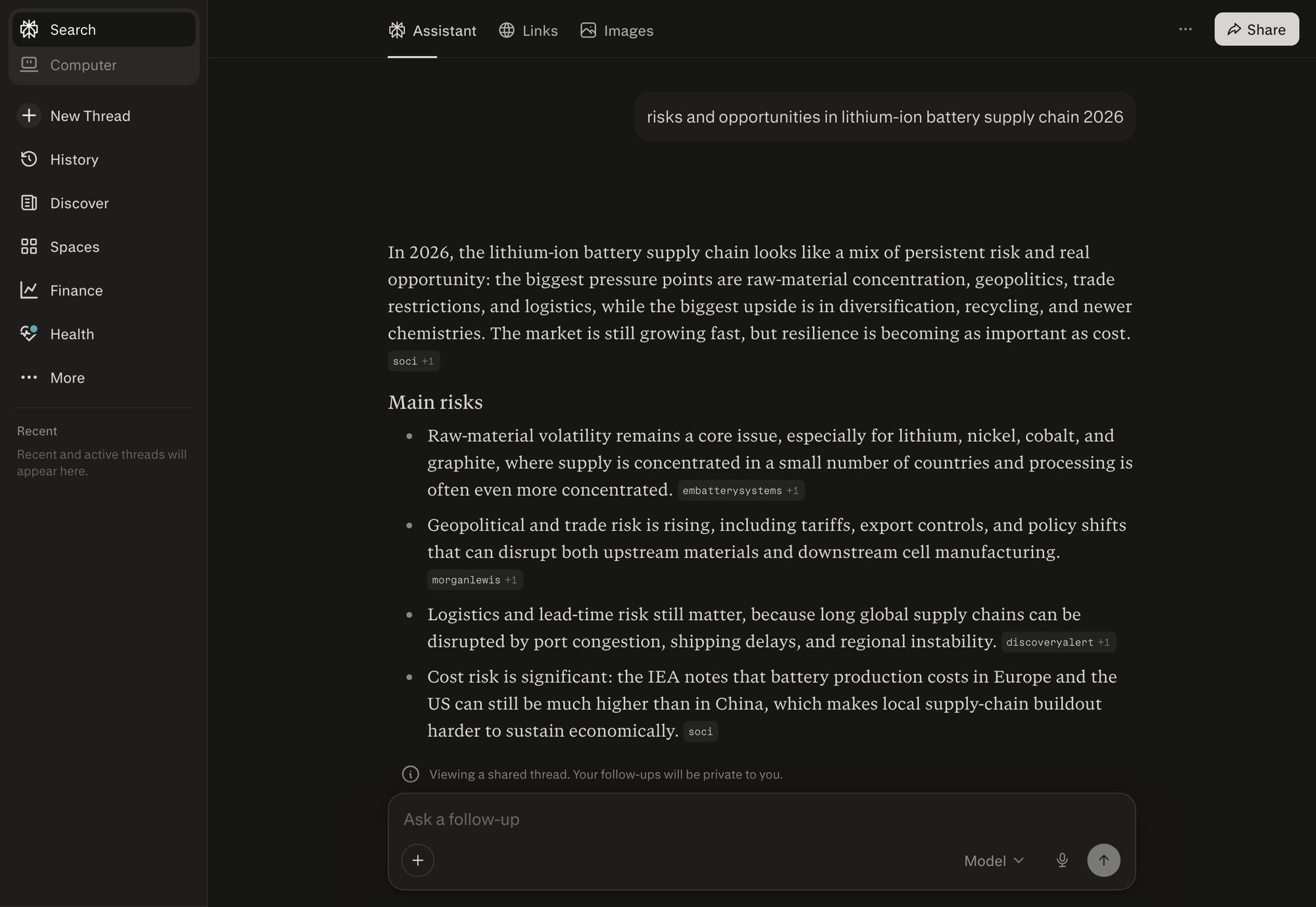
You get a clean list of risks with inline citations. It takes seconds. But notice what is missing: no confidence levels, no source disagreements surfaced, no structured data you can export. It reads the top results and summarizes them. When sources conflict on whether costs are rising or falling, Perplexity picks one and moves on.
Where it wins
- Great for top-of-funnel discovery.
- Clean interface and easy copy-paste into notes.
- Citations at least point you in the right direction.
Where it breaks down
- Synthesis is shallow. You get a summary, not a research report.
- It rarely shows disagreements between sources. The output feels confident even when the evidence is thin.
- It does not give you structured artifacts like tables, diagrams, or export-ready reports.
Pricing Perplexity Pro is $20 per month. It is cheap enough to keep around as your quick answer engine. It is not built to replace real research work. Perplexity pricing
Bottom line Perplexity is the best ai research assistant only if your definition of research is fast answers and light browsing. If you need a report you can defend, it is a good starting point, not a finish line. If you are graduating from quick answers to defensible research, see our guide to the best Perplexity alternative for deep research work.
ChatGPT Deep Research: the long-form synthesizer
ChatGPT Deep Research is built for long-form output. It will research a topic, reason about it, and produce a narrative report. This is great when you need a coherent story, especially for broad topics.
For our lithium supply chain query, ChatGPT Deep Research produces a multi-page narrative covering raw material risks, geopolitical factors, and recycling opportunities. The writing is polished and coherent. But the output reads like a confident essay, not a research report. You do not see which claims have strong evidence and which are speculation. There are no confidence ratings. When two sources disagree on China's market share projections, the model picks one number and presents it as fact.
Where it wins
- Strong at summarizing complex topics into a single narrative.
- Good for early drafts and briefing docs.
- Useful when you need a quick, well-written overview.
Where it breaks down
- OpenAI has publicly acknowledged that deep research can hallucinate facts and struggle with confidence calibration. That means it can sound sure when it should not. OpenAI deep research announcement
- It is a single model doing sequential research. You do not see separate academic, technical, and community perspectives.
- Verification still takes work. You must click through citations and check them yourself.
- Availability and usage vary by plan, which matters if you research daily.
Pricing ChatGPT Plus is $20 per month and includes access to deep research. ChatGPT Pro is $200 per month. For the price, you are buying convenience and a strong narrative, not transparency. OpenAI pricing
Bottom line ChatGPT Deep Research is good for synthesis. It is not ideal when the evidence is mixed, when sources conflict, or when you need to audit every claim. It is a useful tool, but it is not the gold standard for verification.
Rabbit Hole: the multi-agent research system
Rabbit Hole is built for real research, not just a confident answer. It runs inside Rush, the macOS agent platform, and uses specialist agents in parallel to gather evidence from different source types. The output is a structured report with confidence ratings and citations, plus exportable artifacts.
Here is what a real Rabbit Hole report looks like. This is an actual output from a Wabi AI investment thesis, not a mockup:
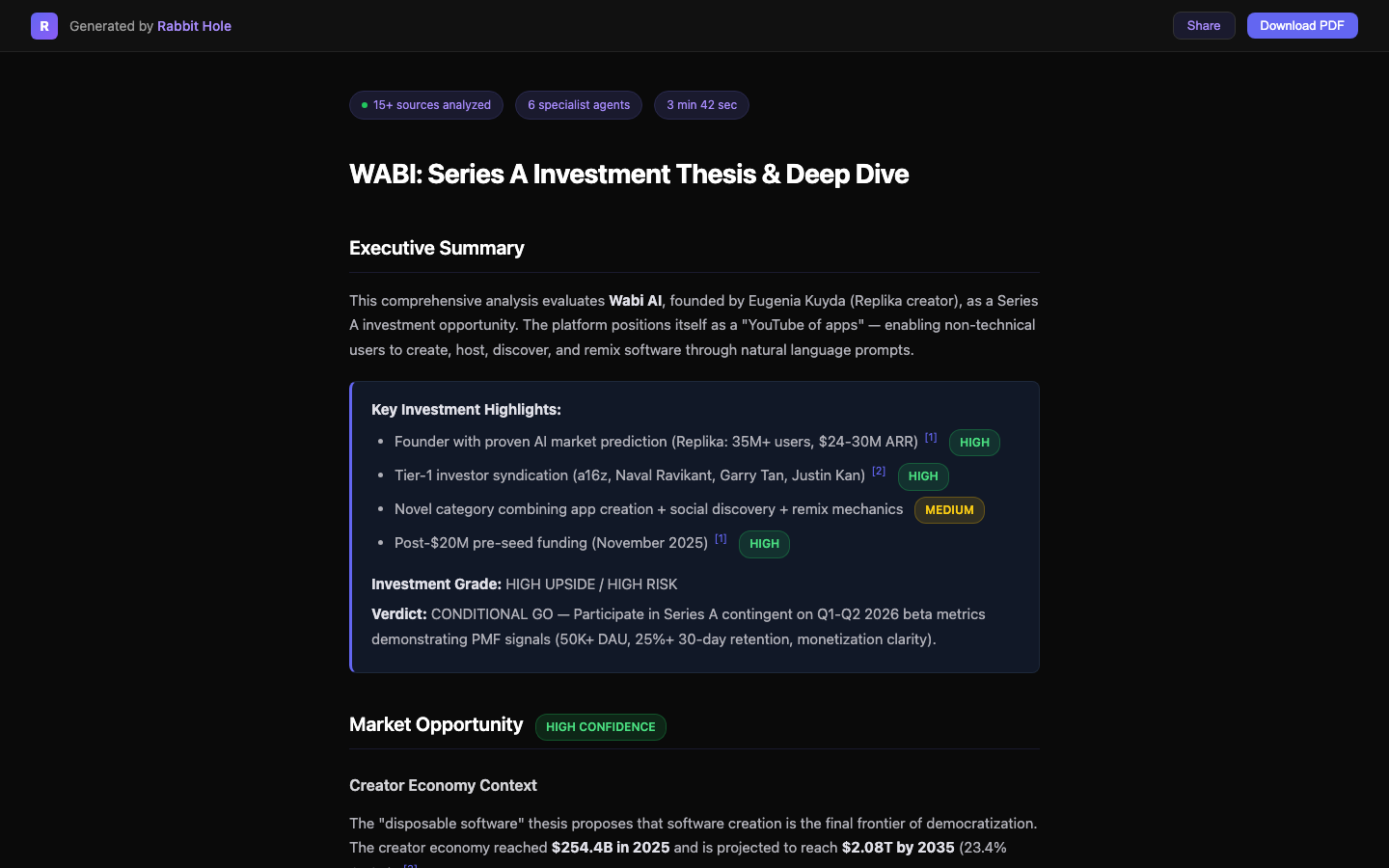
Notice the difference. Every claim has a confidence badge. The report distinguishes HIGH confidence findings (backed by multiple corroborating sources) from MEDIUM confidence findings (where evidence is thinner or sources disagree). You see exactly where to trust the output and where to dig deeper. The report also shows how many sources were analyzed, how many specialist agents ran, and how long it took.
Where it wins
- Multi-source depth: academic, technical, product, social, community, and visual modes in parallel.
- Confidence ratings make it obvious which claims are strong and which are shaky.
- Artifacts are first-class: reports, tables, and diagrams you can reuse.
- It is honest about gaps and contradictions, which is what real research needs.
Where it breaks down
- It is not instant. Deep research takes minutes, not seconds.
- It is not a generic chat app. You need to define scope and deliverables.
- It currently requires macOS through Rush.
- It is more expensive per report than a flat $20 subscription.
Pricing Rabbit Hole has a free tier with 3 reports per month. Basic is $29 per month for 15 reports. Plus is $79 per month for 40 reports. That is a deliberate trade: fewer reports, but higher quality per report.
Bottom line If you want a research system you can trust and reuse, Rabbit Hole is the best ai research assistant in this list. If you only need quick answers, it is overkill.
Which one should you pick?
Price matters, but the bigger question is what you get for that spend: fast answers, polished synthesis, or an auditable report with confidence ratings.
Here is the blunt answer.
- Use Perplexity when you want a fast scan or a quick definition.
- Use ChatGPT Deep Research when you want a coherent narrative and do not mind verifying sources yourself.
- Use Rabbit Hole when you need a report you can defend, with sources you can audit and artifacts you can ship.
Looking for a Perplexity alternative?
If your workflow outgrew fast answers, you are probably looking for a perplexity alternative that can do real research. That is Rabbit Hole. It trades speed for depth, and it shows you what is real versus what is speculative. If you are doing diligence, strategy, or technical evaluation, that trade is worth it.
Looking for a ChatGPT Deep Research alternative?
If you like the long-form output but need more transparency, Rabbit Hole is the chatgpt deep research alternative to consider. It will not pretend the evidence is clean when it is not. You get multiple perspectives, explicit confidence levels, and exportable artifacts.
The real decision
There is no universal best ai research assistant. There is only the best tool for the kind of work you do.
If you want to pressure-test any of these tools before trusting them, use a verification workflow instead of a vibe check. We broke that process down in How to Verify AI Research Output, and we also explained why polished deep research reports create false confidence in Deep Research Tools Look Credible. That's the Problem..
- If you live in quick questions, Perplexity wins on speed.
- If you live in narrative summaries, ChatGPT Deep Research wins on coherence.
- If you live in decisions where mistakes cost money, Rabbit Hole wins on credibility.
Pick the tool that matches the stakes. Then verify anyway.
If you want a focused breakdown of the most-searched option in this category, read ChatGPT Deep Research in 2026.
Try Rabbit Hole free on Rush, the macOS agent platform.
Related Articles
The 2026 Buyer's Guide to AI-Powered Research Assistants
The best ai-powered research assistant in 2026 depends on whether you need a fast answer, a literature workflow, or a report you can actually defend after the meeting.

ChatGPT Deep Research vs Perplexity vs Rabbit Hole: Which One Cites Sources That Actually Exist?
If a deep research tool gives you a polished paragraph with one dead link or one unsupported claim, the report is already compromised. Here is the citation test that matters.
AI Patent Search: From IPC Code to Cited Report in 5 Minutes
Patent search is not one query. It is text, classification, citations, and non-patent literature across multiple databases. Here is the workflow that gets you from an IPC code to a cited report faster without pretending verification is optional.
Ready to try honest research?
Rabbit Hole shows you different perspectives, not false synthesis. See confidence ratings for every finding.
 Try free